Maybe you signed up to immudb Vault already or maybe you never heard of it yet - no matter what, here comes a great use case to think about. There are application logs that need special attention and there is a need to store the log files safe, tamperproof, and timestamped. When your application runs in a Docker container you will find a simple Python script in this post to ship your container logs to immudb Vault.
Btw. you can find the immudb vault release post here at TechCrunch
The idea of the following script is to store docker logs as separate documents in Vault. To do it we will be using a python script docker_logvault.py that is using immudb Vault API.
To run this use case the following prerequisites are required:
- Linux system,
- Python 3.10 installed,
- Docker installed.
Installations#
First install the dependencies in your environment by running:
Create a requirements.txt file with the following content:
docker==6.1.2
requests==2.31.0
Then run:
pip install -r requirements.txtThe script assumes that the API_KEY to immudb vault is stored in environment variable VAULT_API_KEY. You can do so by running export VAULT_API_KEY=<YOUR Personal API KEY>
Also store the Python script as docker_logvault.py
`import docker import requests import json, sys, os from datetime import datetime
def get_api_key(): API_KEY = os.environ[“VAULT_API_KEY”] return API_KEY
def put_to_api(json_doc, verify_SSL): url = f"{domain}/ics/api/v1/ledger/{ledger_name}/collection/{collection_name}/document" headers = { ‘accept’: ‘application/json’, “X-API-Key”: API_KEY, ‘Content-Type’: ‘application/json’ } response = requests.put(url, data=json_doc, headers=headers, verify=verify_SSL) print(response.status_code, response.json())
def monitor_logs(container, verify_SSL=False): i = 1 log_data = "" for line in container.logs(stream=True, follow=True): log_data += line.decode(‘utf-8’) if ‘\n’ in log_data: lines = log_data.split(’\n’) for log_line in lines[:-1]: i += 1 doc = { “id”: i, “timestamp”: str(datetime.now()), “log_line”: log_line.strip() } json_doc = json.dumps(doc) put_to_api(json_doc, verify_SSL) log_data = lines[-1]
if name == “main”: # Check if arguments are provided if len(sys.argv) < 2: print(“The required argument: <container_name> is not provided.”) sys.exit(1) container_name = sys.argv[1] domain = "" if len(sys.argv) == 2: domain = “https://vault.immudb.io” ledger_name = ‘default’ collection_name = ‘default’ elif len(sys.argv) == 3: domain = sys.argv[2] ledger_name = ‘default’ collection_name = ‘default’ elif len(sys.argv) == 4: domain = sys.argv[2] ledger_name = sys.argv[3] collection_name = ‘default’ elif len(sys.argv) == 5: domain = sys.argv[2] ledger_name = sys.argv[3] collection_name = sys.argv[4] elif len(sys.argv) > 5: print(“Too many parameters provided.”) sys.exit(1) client = docker.from_env() try: container = client.containers.get(container_name) except: print(f"There is no container {container_name} running at the moment. Start the container and then run the script again.") sys.exit(1) API_KEY = get_api_key() verify_SSL = True if domain[:4] == “https” else False monitor_logs(container, verify_SSL)`
Create a collection to store logs#
If you are a free-tier user of immudb Vault you can skip this step as the default collection is created automatically when you post first documents to My Vault.
Let’s create a collection default. The index is id.
curl -kX 'PUT' \
 'https://vault.immudb.io/ics/api/v1/ledger/default/collection/default' \
 -H 'accept: */*' \
 -H "X-API-Key: $VAULT_API_KEY" \
 -H 'Content-Type: application/json' \
 -d '{"fields":[{"name":"id","type":"INTEGER"}],"idFieldName":"_id","indexes":[{"fields":["id"],"isUnique":true}]}'
Run the docker container#
As an example docker python 3.11 container named python-instance will be started in interactive mode.
docker run -it --rm --name python_instance -v "$PWD":/usr/src/myapp -w /usr/src/myapp python:3 pythonNow all stdout outputs are available via docker logs python_instance command.
Start logging your results#
The script is in docker_logvault.py file. The script accepts the following arguments:
- container name,
- (optionally) domain. The default value is ‘https://vault.immudb.io’,
- (optionally) ledger name (the default value is
defaultand this is the ledger name for free tier users), - (optionally) collection name (the default value is
defaultand this is the collection name for free tier users).
The script reads the stream of logs from the container, processes it into JSON documents, and stores the documents in immudb Vault. Start the script by running:
python docker_logvault.py python_instanceCheck that the logs are in immudb Vault
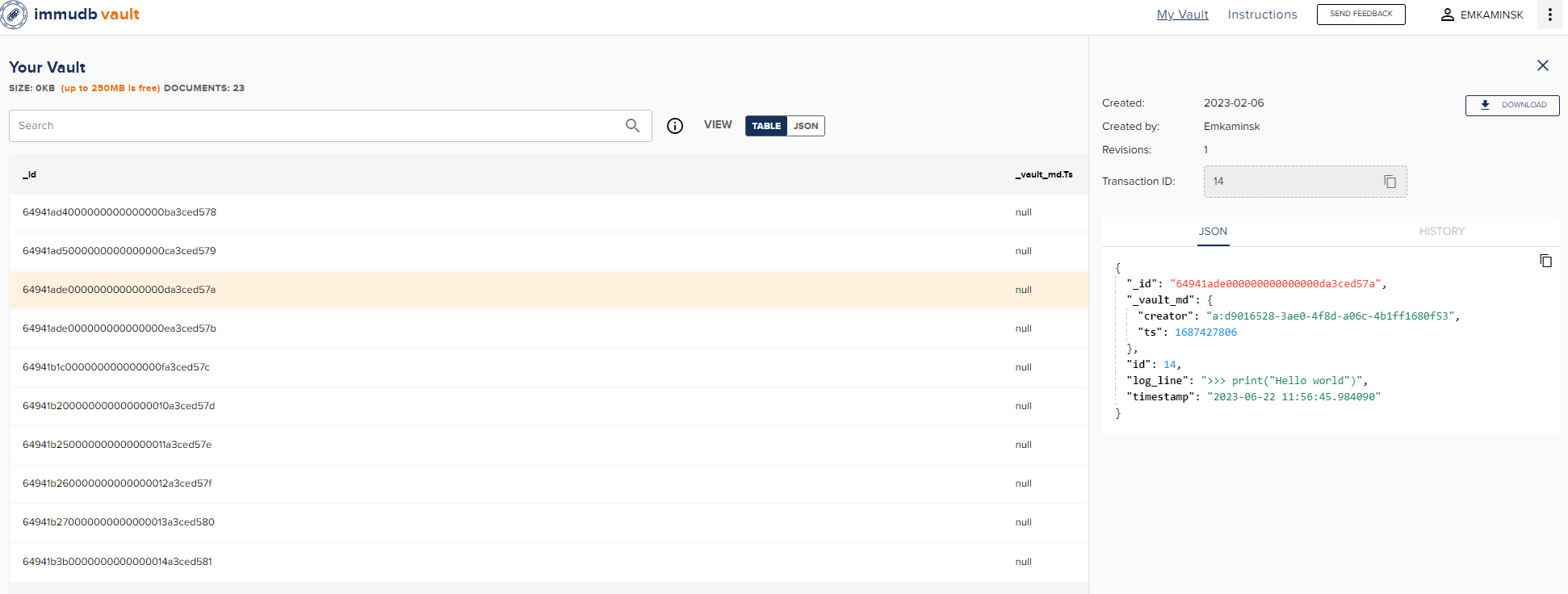
At any point, you can check that the logs are stored in the vault. You can use the ‘immudb Vault’ webpage or use API and run this command:
curl -kX 'POST' 'https://vault.immudb.io/ics/api/v1/ledger/default/collection/default/documents/search' \ -H 'accept: application/json' \ -H "X-API-Key: $VAULT_API_KEY" \ -H 'Content-Type: application/json' \ -d '{ "desc": true, "page": 1, "perPage": 100, "query": { "expressions": [{ "fieldComparisons": [{ "field": "id", "operator": "GE", "value": 1 }] }] } }' | jq '.revisions[].document.log_line'
Summary#
This is only one of many great examples how easy you can store data tamperproof using immudb Vault.